Web Search is a new Harper Assist feature that allows the AI to search the public web and use public online sources to help answer your questions.
This is particularly useful for:
- general background research
- recent news and developments
- market or company research
- finding public source material
You can also watch a short demo here:
Important confidentiality warning
When Web Search is enabled, content from your chat may be used to create search queries that are sent to the public internet.
Do not use Web Search in a chat that contains client-identifiable, confidential, or privileged information.
If your current chat includes confidential material, the safest option is to:
- turn off Web Search, or
- start a new chat before using it
When Web Search is active, you will see this warning in Harper Assist: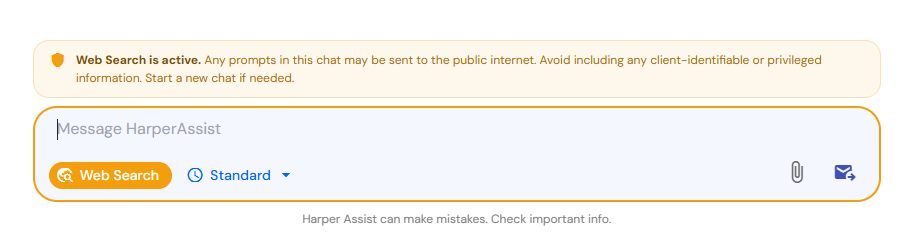
Web Search is active. Any prompts in this chat may be sent to the public internet. Avoid including any client-identifiable or privileged information. Start a new chat if needed.
How Web Search works
When Web Search is enabled, Harper Assist analyses:
- your latest question, and
- the recent context of the conversation
It then creates one or more search queries to find relevant information on the public web.
This means the AI may use not only your latest message, but also information from the current chat to understand what you are asking and to build a useful search query.
Because of this, anything already included in the chat could potentially influence what is sent externally. That is why Web Search should only be used in chats that do not contain confidential or privileged information.
When to use Web Search
Web Search is best used for questions that need:
- up-to-date public information
- recent news or announcements
- public company or market information
- general background research
- links to external source material
Example
You might ask:
“Find recent news articles about Harper James.”
Harper Assist can then search public sources and provide:
- a summary of the findings
- direct links to the original sources
When not to use Web Search
Do not use Web Search if your chat includes:
- client names or identifying details
- confidential contract information
- privileged legal discussions
- sensitive commercial information
- any information that should not be sent outside Harper Assist
If you need Web Search for a general research task, but your current conversation already includes sensitive material, start a new chat first.
Best practice
Before turning on Web Search, ask yourself:
Does this chat contain any client-identifiable, confidential, or privileged information?
- If yes, do not use Web Search in that conversation
- If no, Web Search may be suitable for public research tasks
Recommended approach
- Use one chat for confidential legal work
- Use a separate new chat for public web research
This helps reduce the risk of sensitive information being included in web search queries.
What you will see in Harper Assist
When Web Search is enabled:
- you will see an on-screen warning
- Harper Assist may use public online sources to answer your question
- responses may include links to source material for review
These links allow you to check the original source yourself.
Quick summary
Web Search is a powerful way to expand Harper Assist with up-to-date public information, but it must be used carefully.
Remember:
- Web Search sends queries to the public internet
- the AI may use your latest question and chat context
- do not use it in chats containing client-identifiable, confidential, or privileged information
- if needed, start a new chat before enabling Web Search
Learn more
Watch the demo video here:
Using Web Search in Harper Assist
If you have any questions or feedback, please use the Feedback menu in Core.
Was this article helpful?
That’s Great!
Thank you for your feedback
Sorry! We couldn't be helpful
Thank you for your feedback
Feedback sent
We appreciate your effort and will try to fix the article