Due to the sensitive information us as a law firm hold, there are constant phishing scams and fake emails attempting to take money and/or information from us. How can we spot this?
There are many ways to spot a fake email and/or scam if you look for key details.
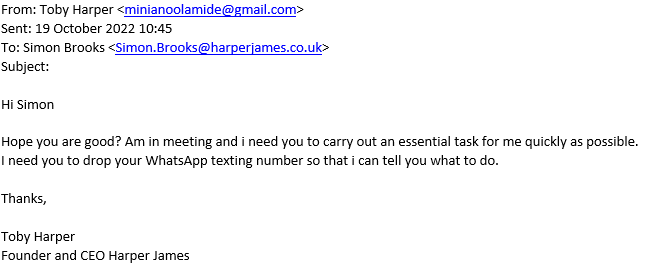
- The first thing you’ll always want to look at is the email address itself, in this case, it is obvious that this isn’t an email address from within the company, however in other situations it can be harder to spot, as they may have similar domains or a similar name, they’ve been able to register it as. In these cases, you will either have to pay closer attention to the discrepancies or look out for the other signs.
- The second thing they will usually say is that it is an urgent matter and must be done as quickly as possible. This tactic is used to try and get you into a rushed state and not look for the discrepancies stated in number 1. When these emails state it is an urgent matter slow down for a second and make sure the person emailing you is the actual person and not a fake.
- They will usually ask to then continue the conversation outside of the email system in order for you to be unable to spot the faults in their email address, sign off and a multitude of other things. This tactic attempts to reduce the security put in place by the company by using a third-party piece of software, which we do not hold records on and have less control over. No one within the company will ask for an urgent matter to be done over WhatsApp or text, when both Outlook and Microsoft Teams are both more efficient and more secure. If you see this, it should raise immediate red flags and you should stop contact with the email address immediately.
- The final thing you should check for are links sent within the email. If the email has a link, make sure you hover over it with your cursor prior to pressing. This allows you to see some of the data behind the URL and see whether what you are about to click on is legitimate or an attempt to scam either you or the company out of money or sensitive data. If the link you see when hovering over the URL is different to what you thought you were about to click, do not press it; assume it is poisoned.
- In the case of you spotting any of these red flags you should contact the Helpdesk as soon as possible in order to not risk other co-workers falling for the scam. The email for the Helpdesk is helpdesk@harperjames.co.uk and if you are ever unsure of whether an email is legitimate or fake, contact the Helpdesk, we are always willing and available to help. There is a no blame policy at Harper James so if you do fall for one of these fakes don’t be afraid to tell us, they’ll be no blame as people aren’t perfect. It is better you contact the Helpdesk at helpdesk@harperjames.co.uk than keep it to yourself if you do ever fall victim to these scams, as it will help us identify what happened, if any sensitive data was obtained and how can we prevent it from happening in the future.
Below is an example of a phishing email coming from someone claiming to be the CEO of Harper James.
Was this article helpful?
That’s Great!
Thank you for your feedback
Sorry! We couldn't be helpful
Thank you for your feedback
Feedback sent
We appreciate your effort and will try to fix the article